How to complete Form 4547
You can complete and file IRS Form 4547 through the Trump Accounts app and trumpaccount.com. Note that accessing trumpaccount.com on a mobile device will redirect you to the Trump Accounts app. You can also complete the form through the official IRS website. All methods require identity verification to submit the form, including taking a photo of a government-issued ID and a live selfie. Upon submission, your information will be securely sent directly to the IRS.
After the IRS processes your IRS Form 4547 and confirms your child's eligibility, you'll receive an email from no-reply@trumpaccounts.treasury.gov and an in-app notification with instructions to activate your child's account. You can monitor the status of your account election through the IRS website.
Note that if you elected for an eligible child or children to receive the $1,000 pilot contribution from the U.S. Department of the Treasury, it will be automatically deposited sometime on or after July 4, 2026, once eligibility is confirmed and the account has been activated.
If you filed IRS Form 4547 with your 2025 taxes this year, no further action is needed until you receive notification to activate your child’s account. If not, you can file IRS Form 4547 through the app or your IRS online account.
Your information
The form requires the following information about the parent, legal guardian, or other authorized individual of the child or children who you’re electing to open this account for. You will be the responsible party who manages the account for your children until they reach age 18.
- Name: Enter your legal first, middle (optional), and last name. These should match the name on your Social Security Card
- Social Security number (SSN): Enter your SSN or individual taxpayer identification number (ITIN)
- Date of birth: Enter your date of birth
Contact information
As the person completing this form, enter the following contact information. Enter the address where you currently live. If the child lives at a different address, you'll have the option to specify that next.
- Address: Enter your street address, apartment or suite (if applicable), county*, state or territory, and zip code
- Phone: Enter your mobile phone number
- Email: Enter your email address
*Accurate county information will ensure your child receives qualified class contributions for the residents of that county who are eligible.
Information for child 1 and 2
You’re required to enter the following information for your child or children. You can add up to 2 children per submission form. Children who are under the age of 18 for the entire remainder of the current calendar year and who have a valid SSN are eligible for this account. Note that children must be U.S. citizens and born on or after January 1, 2025 through December 31, 2028 to qualify for the $1,000 pilot contribution.
- Name: Enter the child’s legal first, middle (optional), and last name that matches the name on their social security card
- Social Security number: Enter the child’s SSN
- Date of birth: Enter the child’s date of birth
- Relationship to child: Select who you are in relation to this child, the parent, legal guardian, or other authorized individual (such as a grandparent or adult sibling)
- Child lives at a different address: Check the box next to this option if the child lives at a different address than what you entered in the previous Contact information section.
- Check box if you are authorized to open the Trump Account for the child: Check this box as the responsible person completing this form. By making these elections, you are representing, under penalty of perjury, that you are authorized to open the initial Trump Account for the child. See the instructions link in the form for additional information.
In the Add Another Child section of the form, select the plus sign (+) to reveal additional fields where you can submit information related to a 2nd child. For additional children, you’ll need to complete a new IRS Form 4547.
Finalize and submit
This section asks you to confirm all the information you’ve entered in the form about yourself and your child or children.
- Read the consent and authorization statement confirming you authorize the IRS, U.S. Department of Treasury, and their agents to validate and maintain a Trump Account for the child.
- Your signature: Enter your legal first and last name in the signature box to confirm that you have examined the form and that to the best of your knowledge and belief, it is true, correct, and complete.
After confirming that you've entered all the form's required information for yourself and your child or children, select Continue to proceed to identity verification. Once your identity has been successfully verified, your form will be automatically submitted to the IRS on your behalf. If you close out before completing the form and reaching the verification step, your progress will not be saved and you’ll need to complete all the required information again.
How to check election status
You can view the status of an existing IRS Form 4547 election from the IRS website:
- Sign in with ID.me
- Go to Forms → Trump Accounts
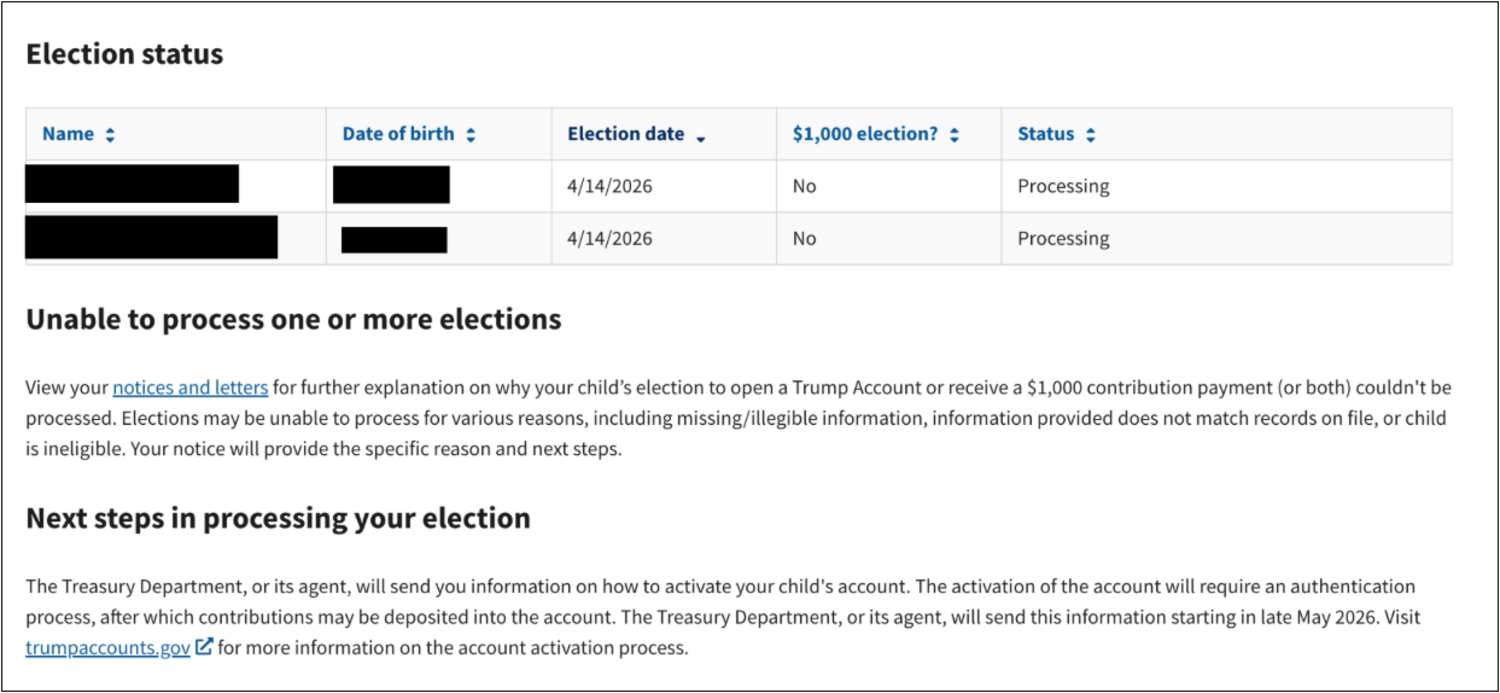
- Review the Election status table (shows multiple children, if applicable)
- If the status is Processing, then look for an email from the IRS soon with next steps. Note that if the status is Unable to process, review the notices and letters for why, and then check out Unable to process for details about why your application might not have been processed and why you might need to reapply.
If you’re having trouble accessing your individual online IRS account, review this IRS FAQ for help.
Unable to process
The following are some of the common reasons why you might get an error about ineligibility, unable to verify, or unable to process when applying for your child’s Trump Account.
IRS email says my child is ineligible or can’t be verified
The reasons for ineligibility or an inability to verify your child are classified as federal tax information, therefore we cannot legally view or share the specific reason why the IRS has made this determination.
Common reasons for this are that the information you entered in the form, such as the child’s name, birth date, or SSN, doesn’t match what was filed with your taxes. Below are some ways you can troubleshoot this issue:
- Review Child eligibility to confirm your child is eligible
- Go to the official IRS online site and sign in with ID.me
- Select My Elections → Unable to Process
- Open the provided link to view the official IRS notice that explains the specific reason why your application was rejected and next steps to correct the error
- After correcting any information with the IRS, you can then submit a new Form 4547, and wait for a new email with next steps
IRS email says I can’t be verified as the responsible party
Because of federal data privacy requirements, we can’t view exactly which verification step didn't pass. A common reason is a difference between the information you entered on IRS Form 4547 and what the IRS has on file for you, such as your legal name, SSN, or date of birth. Sign in to the IRS website, and review and correct your election information. Then submit a new IRS Form 4547, and wait for a new email with next steps.
IRS email says my child already has an account
Each child can only have 1 Trump Account across all brokerages. If another responsible party has already signed your child up for an account, you’ll need to reach out to them. Because of federal privacy requirements, we can’t share any details about who opened that account. If you believe this was done in error or without your authorization, contact us and we’ll provide next steps.
Your child turns 18 this year
Trump Accounts must be opened before the end of the calendar year in which the child turns 17. Once that date has passed, a new Trump Account can no longer be established for that child. This is a federal program eligibility requirement that we aren't able to override.
My child doesn’t or I don’t have a SSN
A valid Social Security number (SSN) is required for your child and a valid SSN or ITIN (Individual Taxpayer Identification Number)for you, to open a Trump Account. Once your child has a SSN and you have a valid SSN or ITIN, submit a new IRS Form 4547. After the IRS processes your form, you'll receive an email from no-reply@trumpaccounts.treasury.gov and an in-app notification with instructions to activate your child's account. For help getting a SSN for your child, check with the Social Security Administration for guidance.
Other ways to file IRS Form 4547
You can also file IRS Form 4547 with your federal tax return or through your IRS online account.
When filing your taxes
You can file IRS Form 4547 with your electronically filed tax return.
Through your IRS online account
To file IRS Form 4547 through your IRS online account, you will first need to verify your identity with ID.me. This helps protect your information and provide secure access to IRS online services.
If you previously used IRS online account services, you may already have an ID.me account. Sign in using the same email address and password you used previously.
For more details, check out the ID.me IRS Help Site.
FAQ
Yes, you can complete IRS Form 4547 separately in the app or through the official IRS website.
If you believe your child or children meet the eligibility requirements but they were not approved for an account, the information on the form likely doesn’t match what the IRS is expecting from you. You’ll receive an email communication and/or an in-app message citing the reason for not being approved. You may also see additional information in the Notices and letters section of your IRS online account. Check out Unable to process for details about why your application might not have been processed and why you might need to reapply.
Each IRS Form 4547 can cover no more than 2 children. You’ll need to submit an additional IRS Form 4547 for each additional child. Note that filing through the Trump Accounts app allows you to submit up to 16 forms at a time.
You’ll get an email from no-reply@trumpaccounts.treasury.gov and an in-app notification when it’s time to activate your child’s Trump Account and claim any pilot funding or charitable contributions, as well as any other actions or information that we may need from you.
Note that account activation and contribution opens on July 4, 2026. The $1,000 pilot contribution is currently planned to be deposited into eligible Trump Accounts on or after July 4, 2026.
For more account details, such as contribution limits and other frequently asked questions, check out the Trump Account overview.
It is not too late! If you forgot to elect into the pilot program for your child during onboarding, you can change your election at any time. Assuming your child meets all the eligibility requirements, simply submit a new IRS Form 4547, and wait for a new email with next steps.
